Your robots.txt file is probably the most powerful text file on your entire website. It's also one of the easiest to break. A single misplaced slash can hide your best content from Google, block AI crawlers from reading your business information, or accidentally tell every search engine to go away.
The problem? Most site owners never look at it. They set it up once (or more likely, their CMS generated one automatically) and forget it exists. Meanwhile, the crawling landscape has changed drastically. Google alone runs multiple crawler types. Then there's Bing, AI bots like GPTBot and ClaudeBot, and dozens more. Each one reads your robots.txt before touching a single page.
We built a free Robots.txt Checker that fetches any site's robots.txt, parses every rule, lets you test specific URL paths, and flags common mistakes. No sign-up. No email. Just type a domain and see what crawlers actually see.
What the Robots.txt Checker Shows You
The tool does four things in seconds:
- Fetches and displays the raw robots.txt from any domain you enter, so you can see exactly what's live on the server
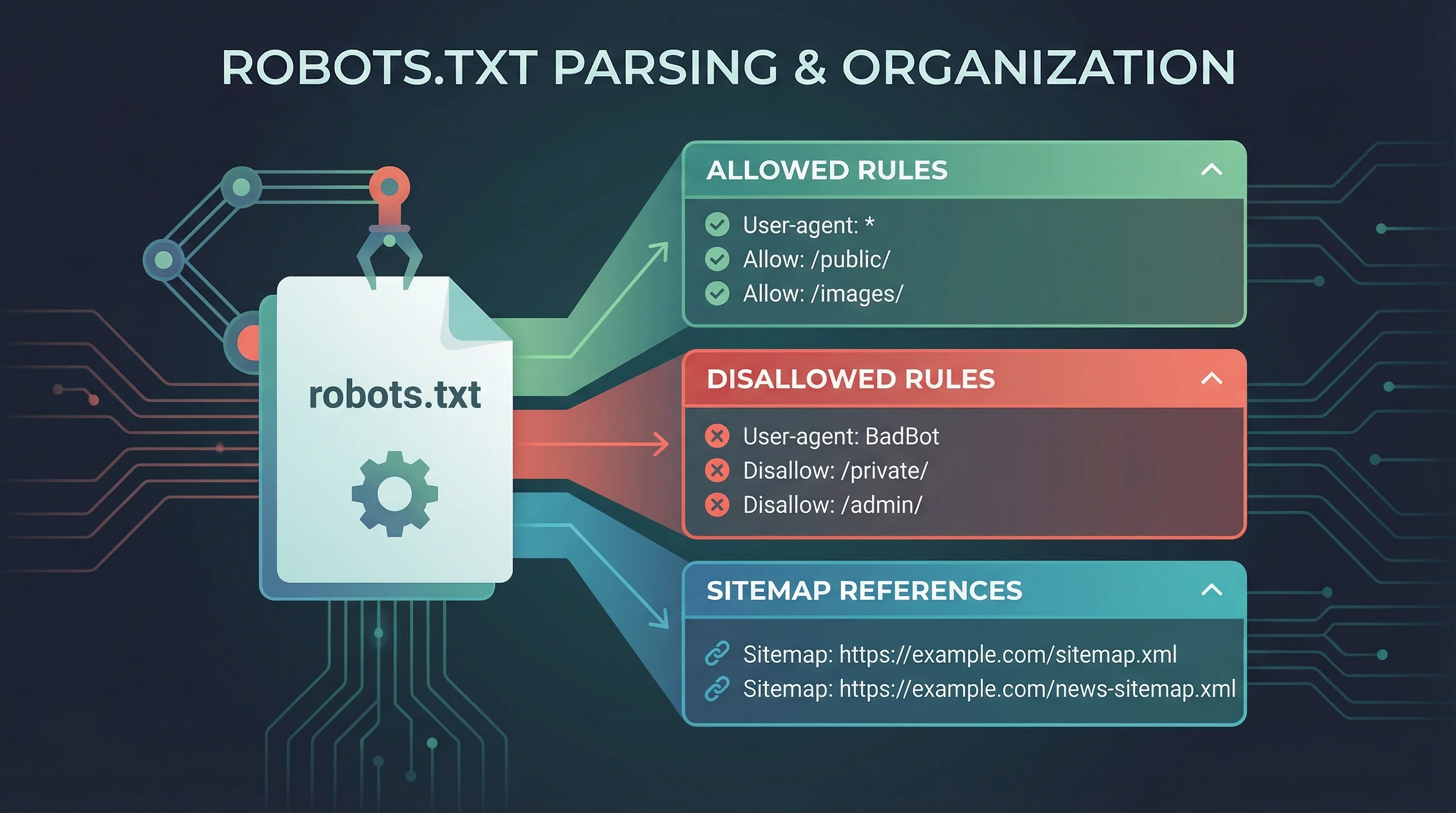
- Parses rules by user-agent, breaking down which crawlers are allowed or blocked from which paths, displayed in expandable accordion panels
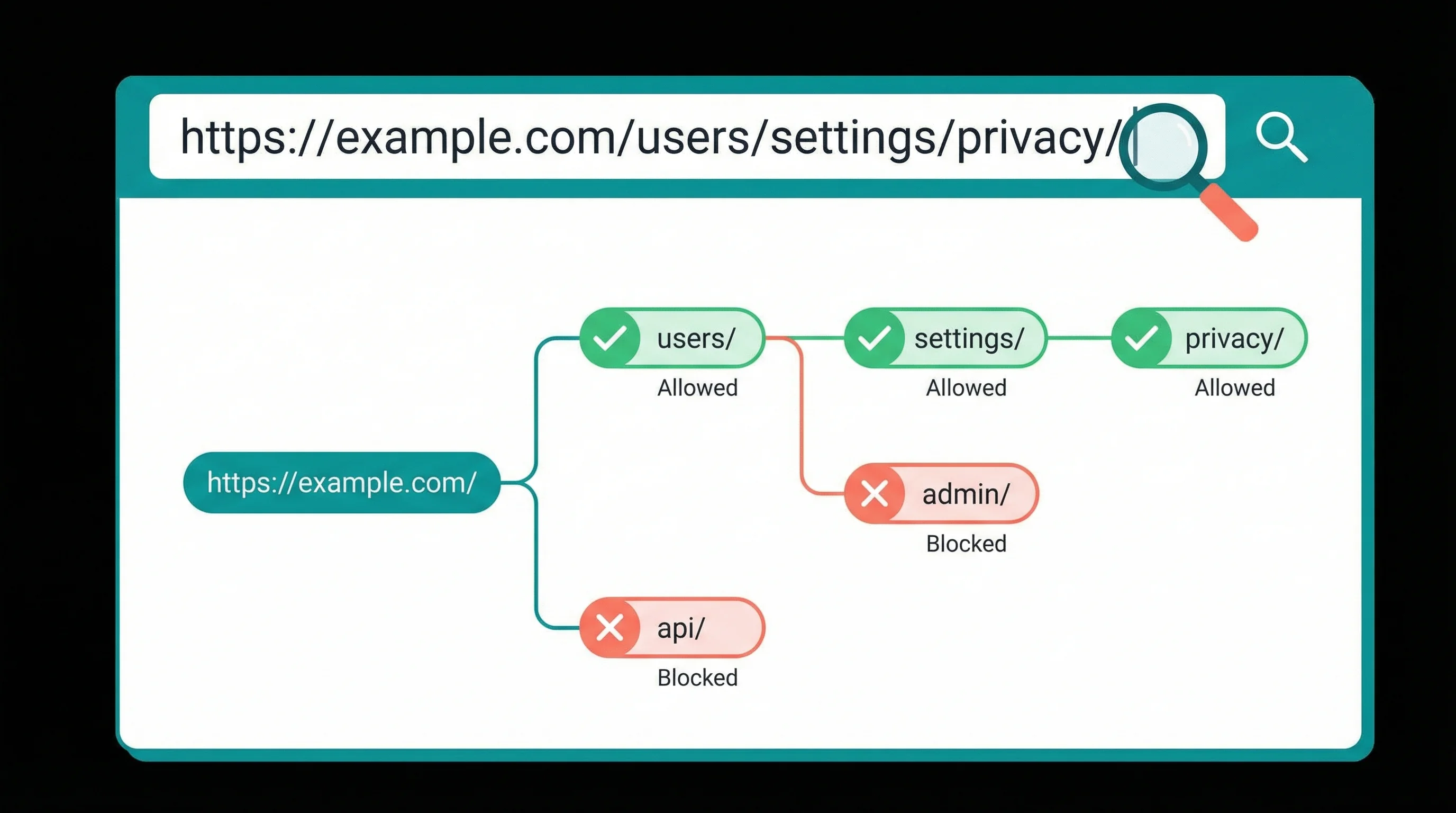
- Lets you test specific URL paths against the parsed rules, telling you whether Googlebot (or any other bot) can access a given page
- Flags issues and common mistakes with severity indicators (errors, warnings, and info notices) so you know what needs fixing first
It also extracts any sitemap references declared in the file. If your sitemap URL is wrong or missing, you'll see that straight away. Our Post Sitemap to CSV guide explains how to export and audit every URL in your sitemaps.
This is one of eight free SEO tools we've built at 365i, alongside our Meta Tag Checker, DNS Lookup, HTTP Header Inspector, HTTPS Inspector, WHOIS Lookup, WordPress Scanner, and Post Sitemap to CSV tool.
Why Checking Your Robots.txt Matters More Than Ever
Research from Expert SEO Consulting found that 73% of websites have robots.txt configuration errors that actively damage their search visibility. And a 2025 Cloudflare study showed only 37% of the top 10,000 websites even have a robots.txt file at all.
That second stat might surprise you. But it makes sense when you consider that many site owners either don't know robots.txt exists or assume search engines will figure things out. They will try, but they won't always get it right.
Google's own robots.txt documentation explains that the file controls crawling, not indexing. A blocked page can still appear in search results if other pages link to it. That confusion alone causes problems for businesses trying to manage their search presence.
"Everyone and my grandmother is launching a crawler."
, Gary Illyes, Google Search Relations, Search Off the Record podcast
I've been watching the crawler landscape change since we started 365i back in 2002. Back then, you worried about Googlebot and maybe a couple of others. Now? The list of bots requesting access to your site runs into the dozens. GPTBot, ClaudeBot, Bytespider, CCBot, PerplexityBot. Each one checks robots.txt. Each one follows different rules about how aggressively it crawls. Gary's right: the "polite era" of a handful of well-behaved bots is over.

AI Crawlers Changed the Game
Before 2024, your robots.txt mostly dealt with search engine crawlers. Now it also controls whether AI models can read and learn from your content. If you're using robots.txt to manage AI crawler access, you need to check that your rules actually work.
Here's the catch. Blocking GPTBot doesn't block Google's AI features. Blocking Google-Extended (the old AI training crawler) no longer does anything since Google deprecated it. And blocking ClaudeBot won't affect how Google's AI Overviews reference your content. Each crawler serves a different purpose.
Our tool parses every user-agent block, so you can see at a glance which bots you've allowed, which you've blocked, and whether your rules are actually doing what you intended. If you've been creating AI discovery files like llms.txt, checking your robots.txt alongside them matters. No point writing an llms.txt that invites AI crawlers in if your robots.txt is slamming the door shut.
"It's a bad idea to frequently update robots.txt because robots.txt can be cached up to 24 hours."
, John Mueller, Google Search Advocate, via Search Engine Land
Mueller's point is often overlooked. People update their robots.txt and expect instant results. It doesn't work that way. Googlebot might not re-fetch the file for a full day. I've seen clients panic-edit their robots.txt three times in an afternoon, not realising that none of those changes had taken effect yet. Check it once, get it right, and leave it alone. That's the approach that actually works.
5 Robots.txt Mistakes That Block Your Own Site
After building this tool and scanning hundreds of sites during development, these are the mistakes we see most often:
- Blocking CSS and JavaScript. This is a leftover from old CMS defaults. If Googlebot can't load your stylesheets and scripts, it can't render your page properly. You'll end up with Google seeing a broken version of your site.
- Using "Disallow: /" after a migration. Development servers often block all crawlers. When the site goes live, someone forgets to remove it. Your entire site vanishes from search results within days.
- Blocking /wp-admin/ without allowing admin-ajax.php. WordPress sites need
/wp-admin/admin-ajax.phpaccessible for many front-end features. A blanketDisallow: /wp-admin/without anAllowexception breaks things. The correct approach is to addAllow: /wp-admin/admin-ajax.phpbefore the disallow rule. - No sitemap reference. Adding a
Sitemap:line pointing to your XML sitemap helps crawlers discover all your pages. About half the sites we've tested are missing this. - Wildcard rules that catch too much. A rule like
Disallow: /*?blocks all URLs with query strings, which sounds fine until you realise it blocks paginated archives, search results, and filtered product pages.
Our checker flags all of these. You don't need to know the robots.txt syntax by heart. Just run the scan and read the issues list.
What Good Hosting Does for Your Robots.txt
WordPress generates a basic virtual robots.txt automatically, and most CMS platforms do something similar. But the defaults aren't always ideal. You'll often want to customise the file: add sitemap references, block admin paths with the right exceptions, and manage AI crawler access. Our WordPress hosting control panel includes tools to help you generate and manage sitemaps, and our support team can advise on robots.txt configuration if you're not sure what to change.
Hosting reliability matters here too. A misconfigured server can return a 500 error for robots.txt, which tells Google to treat everything as blocked. If your web hosting goes down or responds slowly, crawlers assume your robots.txt is broken and may stop crawling entirely.
Consistent uptime on your hosting platform means crawlers always get a clean response from your robots.txt. It's a small thing, but it's the kind of detail that separates reliable hosting from budget alternatives.
If you're interested in how we approach crawl optimisation alongside AI visibility, the AI Visibility Checker on our sister site scans how AI models see your business. And for web design considerations around crawlability, our colleagues at 365i Web Design wrote about GEO vs SEO changes happening right now.
Frequently Asked Questions
What is a robots.txt file?
A robots.txt file is a plain text file at the root of your website that tells search engine crawlers and bots which pages they can and can't access. It uses the Robots Exclusion Protocol, standardised as RFC 9309 in 2022, and is the first file any crawler checks before scanning your site.
Does robots.txt stop Google from indexing my pages?
No. Robots.txt controls crawling, not indexing. Google can still index a URL it hasn't crawled if other sites link to it. To prevent indexing, use a noindex meta tag or X-Robots-Tag HTTP header instead.
How often should I check my robots.txt?
Check it after every site migration, CMS update, or change to your URL structure. For stable sites, a quarterly check catches drift from plugin updates or server changes. Google caches robots.txt for up to 24 hours, so changes don't take effect immediately.
Can I use robots.txt to block AI crawlers like GPTBot?
Yes. Add User-agent: GPTBot followed by Disallow: / to block OpenAI's crawler. The same pattern works for ClaudeBot, Bytespider, CCBot, and others. But blocking one AI crawler doesn't block all AI features. Google's AI Overviews, for example, use Googlebot, not a separate AI bot.
Is the default WordPress robots.txt correct?
WordPress generates a basic virtual robots.txt that works but isn't optimised. It blocks /wp-admin/ without explicitly allowing /wp-admin/admin-ajax.php, and it often lacks a sitemap reference. Most WordPress sites benefit from a custom robots.txt file.
What happens if my site has no robots.txt?
If no robots.txt exists, crawlers treat everything as allowed and will attempt to crawl your entire site. This isn't catastrophic, but it wastes crawl budget on pages that don't need indexing (admin areas, duplicate content, search result pages) and gives you zero control over AI crawler access.
Can I test robots.txt rules before making them live?
Google Search Console includes a robots.txt tester for your own site. Our Robots.txt Checker lets you test any domain's live file. For pre-deployment testing, you can also use the path tester feature to check whether specific URLs would be blocked by the rules you plan to add.
Test your robots.txt for free
Our Robots.txt Checker fetches, parses, and tests crawl rules for any domain. Find out what Google and AI crawlers actually see. No sign-up, no limits.
Check Your Robots.txtSources
Published: · Last reviewed: · Written by: Mark McNeece, Founder & Managing Director, 365i
Editorially reviewed by: Mark McNeece on · Our editorial standards