
There's a setting on a growing number of managed WordPress hosts that can quietly remove your business from AI search, and most owners have no idea it's switched on. It isn't malware and it isn't a bug. It's a deliberate default: block the AI crawlers to save bandwidth. The trouble is that the same crawlers you're blocking are the ones deciding whether ChatGPT, Gemini, Copilot and Google's AI Overviews ever mention you.
I run a hosting company. I also run a sister business, ai-visibility.org.uk, that exists specifically to get sites understood by AI engines. So I sit on both sides of this argument every week. The bandwidth problem is real, and I'll be honest about that. But blanket-blocking is the wrong default for almost every business site, and the worst version of it is the kind you can't even see.
This piece makes the case, with our own server-log data from a real site, for a different approach. Throttle the heavy crawlers, allow the ones that can actually send you visitors and citations, and only block outright when you've got a real reason. Handle it at the infrastructure layer with sensible per-bot rules, not a panicked one-click toggle.
The short answer: for most business websites, no, you should not blanket-block AI crawlers. Blocking the AI search crawlers removes you from ChatGPT, Perplexity, Copilot and Google's AI Overviews, and it does nothing for your normal Google ranking. Allow the search crawlers, throttle the heavy ones at the server, and only block the pure training crawlers if keeping your content out of AI models matters more to you than being found in them.
Why Hosts Started Blocking AI Bots
Let's start with the part the bot-blockers get right, because it's a lot.
Automated traffic now makes up more than half of everything moving across the web. Imperva's 2026 Bad Bot Report found that bots drive 53% of all web traffic, with humans down to 47%, and AI crawlers are the fastest-growing slice of that. On a shared server, a badly-behaved crawler that ignores caching and re-fetches the same pages over and over can chew through CPU and bandwidth that a small business is effectively paying for.
The economics are badly lopsided. Cloudflare's data on what they call the crawl-to-refer gap is the clearest picture anyone has published. For every visitor an AI company sends back to a website, here is roughly how many pages its crawler has already taken:
- Anthropic's crawler: tens of thousands of pages per referral (the ratio was around 286,000 to 1 at the start of 2025, improving to roughly 38,000 to 1 by mid-year as Anthropic added citations)
- OpenAI's GPTBot: around 1,200 pages per referral
- Perplexity: improving, but still well over 100 pages per referral on many sites
- Googlebot, for comparison: about 5 pages crawled per visitor sent
That gap is why the mood among hosts soured. The old bargain, where a search engine took your content and paid you back in traffic, doesn't hold for most AI crawlers. Matthew Prince, Cloudflare's chief executive, put it bluntly when the company launched its pay-per-crawl tools:
"The deal that Google made to take content in exchange for sending you traffic just doesn't make sense anymore."
When I first read that line I nodded along, because the figures back it up and I've watched bot traffic climb on our own platform. But I kept coming back to a problem with the conclusion most hosts drew from it. Prince's answer was about compensation and control for publishers who want it. The answer a lot of WordPress hosts reached for instead was simpler and blunter: just block the lot, by default, for everyone. That's where I get off the bus. A national newspaper protecting paid journalism has a very different stake to a Kettering plumber who desperately needs ChatGPT to know they exist.
The Silent Block You Never See
Here's the part that actually worries me. It isn't that some hosts let you block AI bots. It's that some block them for you, by default, in a way you can't see and can't easily change.
Search Engine Land documented this in detail. On at least one large managed WordPress platform, AI crawlers like GPTBot and Anthropic's ClaudeBot are met with an HTTP 429 response at the platform edge, below the level where your own security plugins or settings live. A 429 means "too many requests." It looks like rate-limiting, not a block, so it doesn't show up as an obvious "access denied." And on that platform it reportedly can't be turned off without an engineering escalation.
"Treating AI access as optional in 2026 is the same call as treating organic search as optional in 2008. It worked for a while. Then it didn't."
Not every host does this, and it's only fair to name the ones taking the opposite line. Kinsta has said publicly it won't block AI crawlers at the platform level and won't bill you for their bandwidth, offering opt-in controls instead. Pressable and Pantheon have said they don't disallow these bots by default either. The point isn't that one host is evil and another is virtuous. The point is that the policy varies enormously, it's usually buried, and the default you happen to be on was almost certainly chosen without anyone asking you.
| Managed host | AI bots blocked by default? | Can you change it? |
|---|---|---|
| WP Engine | Yes. Returns a 429 to crawlers like GPTBot and ClaudeBot at the platform edge | Not without an engineering escalation |
| Kinsta | No. Won't block at the platform level, won't bill for bot bandwidth | Yes, opt-in bot controls |
| Pressable | No. Doesn't disallow these bots by default | Yes |
| Pantheon | No. Doesn't block identified bot traffic | Yes |
| Most shared / cPanel hosts | Usually not by default | Yes, via robots.txt or server rules |
| 365i | Our WAF filters some automated traffic | Yes. We allow any AI crawler on request, 7 days a week |
The column that matters is the third one. A host applying sensible bot protection is fine. A host applying it where you can't see it or change it is the problem. Policies shift, so check your own host's documentation, but the question to ask is always the same: if I want an AI crawler allowed, can I make that happen?

What Blocking Actually Costs You
When you block an AI crawler, you're not just stopping it from training on your content. You're also stopping it from citing you. The crawler that scrapes for training and the crawler that fetches a page to answer a live question are often the same family of bots, and once the door is shut, it's shut to both.
That's the bit the "block everything" advice skips. If GPTBot, ClaudeBot, PerplexityBot and OpenAI's search bot can't read your site, then when someone asks ChatGPT or Perplexity "who's a good web designer in Northampton," your site isn't in the running. Not because you ranked poorly. Because the engine literally never read you. Your competitor, who left the door open, gets named instead.
This is the side of the debate my sister site was built for. The way I put it there:
"AI Visibility is not about being found. It is about being understood."
You can't be understood by something you've barred from the building. We covered the wider stakes of this when the House of Lords called AI a strip-miner of UK websites, and the copyright argument there is fair. But the practical reality for a small business is the opposite of a newspaper's. You're not sitting on a vault of premium content that AI companies are desperate to license. You're trying to get noticed at all. For most of the businesses we host, the risk isn't that AI takes too much. It's that AI never arrives.
What We See Crawling a Real Site
People in the SEO world argue endlessly about whether AI crawlers even bother with the new wave of AI discovery files like llms.txt and ai.json. Some loud voices say the bots ignore them. So rather than argue, we logged it. (We also ship the full suite on client builds: a rebuilt removals firm we recently documented as a case study earned a Platinum 10/10 listing in the AI Visibility Directory off the back of it.)
One of my own sites, mcneece.com, is a small personal WordPress site. Nothing special, no big traffic. Nineteen days ago I installed the AI Discovery Files plugin I wrote, which generates the discovery files and logs every AI crawler that reads them. Here's what those 19 days looked like, to 10 June 2026.
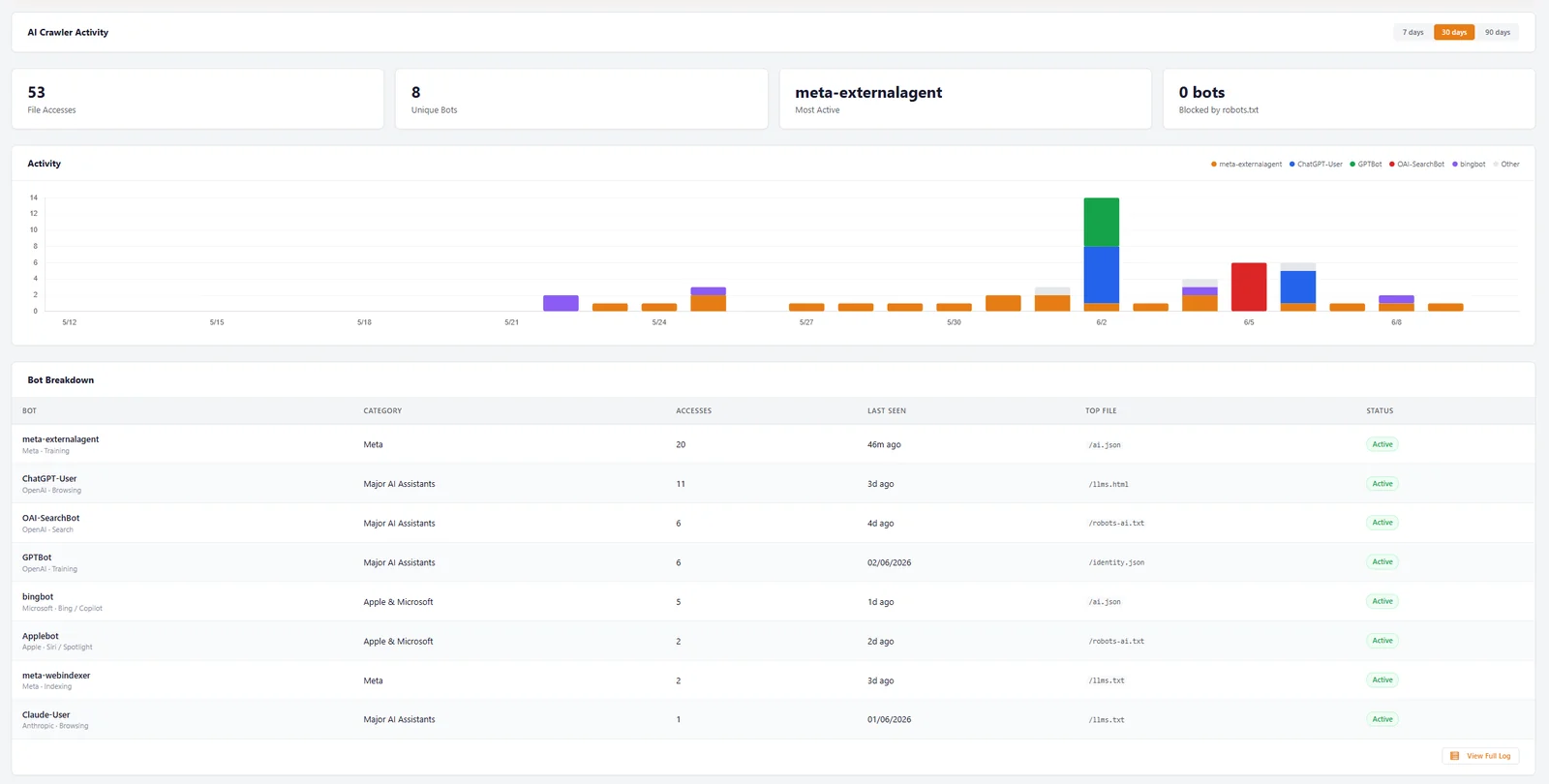
Here's the same data as a table. Eight different AI bots, from five different companies, all reading a tiny new site without being asked twice.
| Bot | Operator | What it feeds | Reads |
|---|---|---|---|
| meta-externalagent | Meta | Llama and Meta AI (training) | 20 |
| ChatGPT-User | OpenAI | ChatGPT live browsing | 11 |
| OAI-SearchBot | OpenAI | ChatGPT Search | 6 |
| GPTBot | OpenAI | OpenAI training | 6 |
| bingbot | Microsoft | Bing and Copilot | 5 |
| Applebot | Apple | Siri and Spotlight | 2 |
| meta-webindexer | Meta | Meta indexing | 2 |
| Claude-User | Anthropic | Claude live browsing | 1 |
Three things in that data matter more than the raw count.
First, every single request returned a 200, and the dashboard's "blocked by robots.txt" figure is zero. Nothing was turned away. That's the whole experiment: when you don't block, they read you. Second, look at the spread. This isn't one stray bot. It's OpenAI's full set (the training crawler, the search crawler and the live-browsing fetch), plus Meta, Microsoft, Apple and Anthropic. The file every one of them read was llms.txt. Third, and this is the honest bit, in the first few days after the files went live only Meta and Bing showed up. The OpenAI, Apple and Anthropic crawlers arrived later in the window, once they'd found the new files. So a quiet first few days doesn't mean the bots are ignoring you. It can just take them a little time to notice.
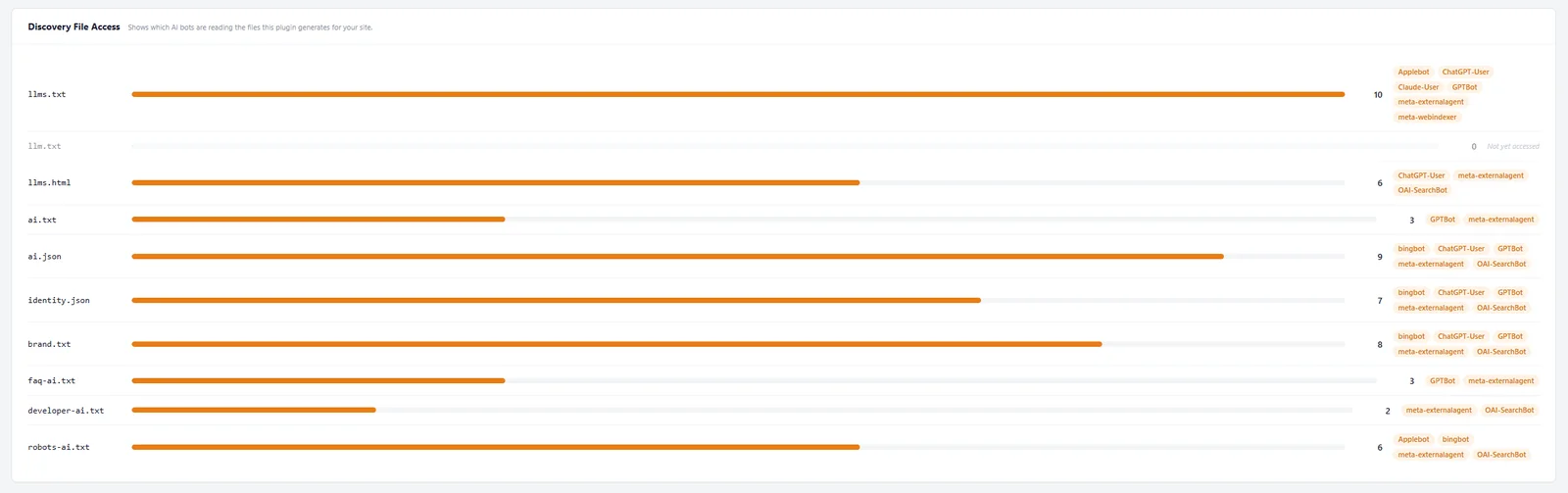
None of this is possible if your host quietly 429s these bots at the edge. Every read in that table is a chance to be understood, quoted and cited. A blanket block turns all 53 of them into nothing. If you want to run the same test, our sister site publishes the full crawler-log methodology, and you can check your own access with the free AI Visibility Checker.
And our one site isn't an outlier. That same free checker keeps a rolling tally of what it finds, and the wider picture is sobering. In the 30 days to publication it had run 167 sites, the average AI visibility score across them was just 48 out of 100, and 41% had no llms.txt file at all. So the bots are out there reading, keenly, but plenty of businesses still aren't giving them anything to read, let alone checking that their host lets the crawlers reach it. Two separate failures, same result: invisible to AI.
Proof That AI Readability Pays
A log full of crawler hits is interesting. What it's worth in the real world is the fair question. Here's one answer.
In April 2026 we launched a new site for a Brewood locksmith, Lockerfella. Standard Linux web hosting, nothing exotic, paired with a clean hand-coded build and full AI discovery files from day one. No backlinks at launch. No reviews on the site at go-live. Within 10 to 12 days it was ranking number one for "Brewood Locksmith" on Google, in ChatGPT and in Gemini, all three at once. We wrote that up in full in the Lockerfella case study.
The owner, Sean Hamilton, put it more plainly than I could: "Honestly didn't think hosting could make this much difference. The site just flies." The reason the AI engines could cite him within days is that nothing was stopping them reading the site. Had that site been on a host that silently blocks AI crawlers, ChatGPT and Gemini would have had nothing to read, and a new business with zero authority would have stayed invisible in exactly the channels that gave it a head start. The money flowing into AI visibility tells you which way this is heading.
Block, Throttle or Allow: How We Set It Up
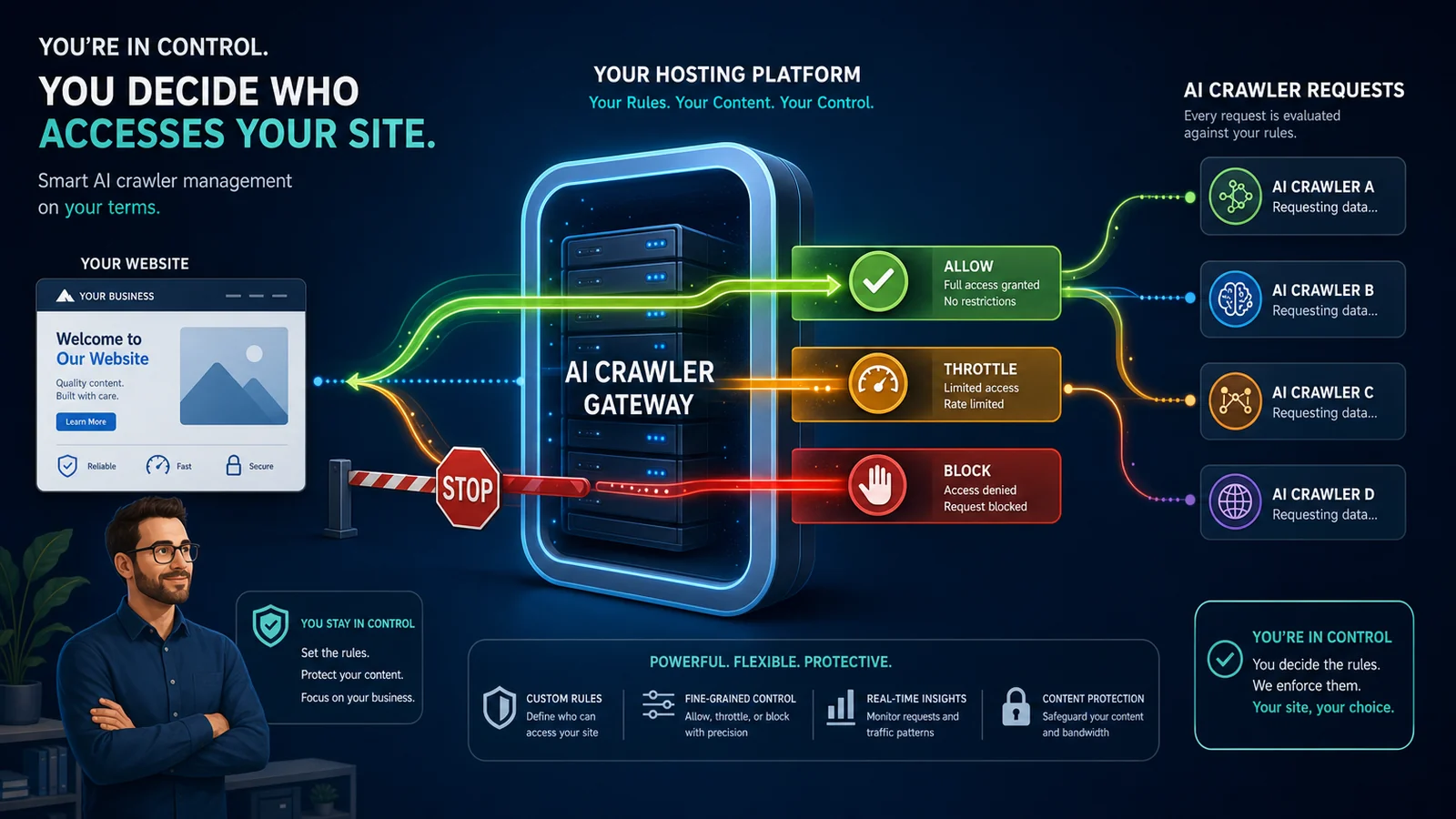
So what's the grown-up version? It isn't "allow everything and let the bots hammer your server." It's per-bot rules, set with intent. The single most useful distinction is between crawlers that can send you something back and crawlers that only take.
| AI crawler (user-agent) | Operator | What it feeds | Our recommendation |
|---|---|---|---|
| OAI-SearchBot | OpenAI | ChatGPT Search results | Allow |
| ChatGPT-User | OpenAI | ChatGPT live, user-initiated fetches | Allow |
| PerplexityBot | Perplexity | Perplexity answers and citations | Allow |
| Google-Extended | Gemini training and AI Overviews grounding | Allow (it controls your AI Overviews presence) | |
| ClaudeBot | Anthropic | Content collection for Claude models | Allow, throttle if heavy |
| GPTBot | OpenAI | OpenAI model training | Block only if you want out of training |
| CCBot | Common Crawl | Open dataset reused by many AI models | Block only if you want out of training |
Those user-agents and purposes come straight from the operators' own documentation: OpenAI's bots page, Google's crawler list, and Anthropic's crawler docs. The split is the whole idea: a search crawler can send you a visitor or a citation, while a pure training crawler only takes.
A sensible starting point in robots.txt looks like this. Let the AI search crawlers in, because they can cite you and send real visitors. Block the pure training crawlers only if keeping your content out of model training matters more to you than being in those models.
# Let the AI search crawlers in. These can cite you and send visitors.
User-agent: OAI-SearchBot
Allow: /

User-agent: ChatGPT-User
Allow: /

User-agent: PerplexityBot
Allow: /

User-agent: Google-Extended
Allow: /

# Block the pure training crawlers, only if you have a reason to.
# This does not affect the search crawlers above.
User-agent: GPTBot
Disallow: /

User-agent: CCBot
Disallow: /
Two honest caveats. Robots.txt is an instruction, not a wall: well-behaved bots respect it, badly-behaved ones don't, which is why the actual enforcement belongs at the infrastructure layer rather than a text file. And throttling is a separate job from blocking. Robots.txt can only say "yes" or "no," it can't say "yes, but gently." Slowing a heavy crawler down so it doesn't flatten your server is something the host has to do at the server or CDN level. That's the bit we handle on our own platform rather than leaving you to fight it in a plugin.
Before you trust any of this, check what your current host is actually doing. You can see it in one line from a terminal. Pretend to be GPTBot and look at the response code:
curl -A "GPTBot" -I https://yourdomain.co.ukIf you get HTTP/2 200, you're being let through. If you get 403 or 429, something is turning that bot away, and it might not be you who decided that. Run it against a few of the user-agents in the table above. Our free Robots.txt Checker and HTTP Header Inspector will show you the same thing in a browser if the command line isn't your thing.
AI Bot Checker
Or skip the terminal. We built a tool that runs this whole check for you: 14 top AI crawlers tested against your site, robots.txt and live server access both, with a ready-to-send message for your host if anything is blocked.
Check your site now Free, no sign-up, takes about 30 secondsNow the part I said I'd be straight about. We run a web application firewall too, and it does filter some automated traffic by default, because bad bots and bot bandwidth are real, which is the whole first half of this article. The difference is what happens next. If you want a specific AI crawler let through on your site, you ask us, and we allow it. No engineering escalation. No closed ticket that goes nowhere. No 429 you can't see or change. You're one message away from control, 7 days a week, through our free 1-to-1 WordPress assistance. That's the whole principle: the decision should be yours, made in daylight, not made for you and hidden.
This is also why a managed platform matters more than a checklist of plugins. On 365i WordPress hosting, the bot handling lives at our infrastructure layer where it belongs, on our own CDN, not bolted on top of your site where it slows everything down. Agencies juggling lots of client sites get the same control across the board on agency hosting, set once rather than site by site.
And if you're worried this hurts your normal Google ranking, it doesn't. Google's own John Mueller has been clear on the point:
"Google doesn't care if you block other crawlers."
That settled it for me the first time I read it, because it removes the usual fear that holds people back. Blocking GPTBot won't dent your Google rankings. Googlebot is a separate crawler with separate rules. So the decision about AI crawlers can be made on its own merits, which is exactly being discoverable in AI search, without dragging your hard-won Google position into it.
When Blocking Is the Right Call
I've spent this whole article arguing against blanket blocking, so let me be fair to the other side, because there are real cases where blocking is right.
- Proprietary intellectual property. If your content is the product, original research, a proprietary database, paid journalism, a course you sell, then keeping it out of training models is a legitimate business decision. Block the training crawlers and mean it.
- Paywalled or members-only content. Anything behind a login or a paywall has no business being readable by a crawler that will reproduce it for free. That should be blocked at the application layer regardless of the AI question.
- Private or sensitive areas. Client portals, internal tools, staging sites, anything that was never meant to be public. None of that should be crawlable by anyone, AI or otherwise.
The thread running through all three is that they're decisions made on purpose, for a reason you could explain to a customer. That's the opposite of a default you didn't choose, applied to a marketing site that lives or dies on being found. And remember the honest caveat from our own log: when we first added the discovery files, the big AI crawlers took a little time to find them. So if you've only just put yours up, the priority isn't fortifying against AI. It's making sure the files are there to be read, and that your host isn't quietly turning the crawlers away before they arrive.
Frequently Asked Questions
How do I check if my WordPress host is blocking AI bots?
Run curl -A "GPTBot" -I https://yourdomain.co.uk from a terminal and look at the response code. A 200 means the bot is allowed. A 403 or 429 means something is blocking or throttling it. Repeat with other user-agents like OAI-SearchBot and ClaudeBot. If you'd rather not use the command line, our free AI Bot Checker runs the whole check for you in a browser, testing 14 AI crawlers in one go.
Does blocking AI crawlers hurt my Google ranking?
No. Google's John Mueller has confirmed that blocking other crawlers doesn't affect Google Search, because Googlebot is a separate crawler with its own rules. Blocking GPTBot or ClaudeBot stops you appearing in those AI tools, but it has no effect on your normal Google rankings. The one exception is Google-Extended, which controls whether your content can feed Google's own AI features like AI Overviews.
Should I block AI crawlers on my business website?
For most business sites, no. Blocking the AI search crawlers writes you out of ChatGPT Search, Perplexity, Copilot and AI Overviews, which is a growing way customers find businesses. Blocking makes sense if your content is proprietary, paywalled, or private. For a marketing or services site that needs to be found, allow the search crawlers and only block pure training crawlers if keeping out of model training matters to you.
What's the difference between throttling and blocking AI bots?
Blocking refuses the crawler entirely, so it can't read your site and can't cite you. Throttling slows it down so it doesn't overload your server, while still letting it read your content. Throttling protects performance without sacrificing AI visibility. Robots.txt can only allow or disallow, so throttling has to be done at the server or CDN level, which is a job for your host's infrastructure rather than a plugin.
Which AI bots should I allow and which should I block?
Allow the crawlers that can cite you and send visitors: OAI-SearchBot (ChatGPT Search), ChatGPT-User, PerplexityBot, and Google-Extended for AI Overviews. Consider blocking pure training crawlers like GPTBot and CCBot only if you want to keep your content out of model training. ClaudeBot sits in between, so allow it but throttle it at the server if it's heavy. Set the rules with intent rather than blocking everything at once.
Do AI crawlers actually read llms.txt and ai.json files?
Yes, and we have the server logs to prove it. Over 19 days on a real site, after installing a plugin that generates and logs them, eight different AI bots from OpenAI, Meta, Microsoft, Apple and Anthropic read the discovery files 53 times, with llms.txt the most-read file. They didn't all appear on day one. The big-name LLM crawlers turned up over the following two to three weeks as they found the new files, which is why the "AI ignores these files" claim is misleading.
Does 365i block AI bots by default?
Our web application firewall filters some automated traffic by default, because bad bots and bandwidth abuse are real. The difference from a silent platform block is that you stay in control. If you want a specific AI crawler allowed on your site, you ask us and we allow it, 7 days a week, with no engineering escalation. You're never silently locked out of AI search without a way to change it.
Will AI crawlers blow my hosting bandwidth or bill?
On some hosts that charge by visits or data transfer, heavy AI crawling can push you toward an overage charge or a higher plan. Hosts handle this differently: some exclude suspected bot traffic from billing, others don't. On our platform, bot traffic is managed at the infrastructure layer and your plan's unlimited LVE resources mean a crawl spike doesn't translate into a surprise bill. Throttling the heavy crawlers keeps performance steady without blocking them outright.
Want bot handling done properly, with you in control?
365i WordPress hosting manages AI crawlers at our own infrastructure layer, on our own CDN, with sensible defaults you can change with a single message. Stay fast, stay protected, and stay visible to AI search.
Explore WordPress HostingPublished: · Last reviewed: · Written by: Mark McNeece, Founder & Managing Director, 365i
Editorially reviewed by: Mark McNeece on · Our editorial standards
Sources and further reading
- Your managed WordPress might be blocking AI bots and you can't see it, Search Engine Land: the silent 429 pattern and host-by-host policies.
- The crawl-to-click gap, Cloudflare: crawl-to-referral ratios for the major AI crawlers.
- Content Independence Day, Cloudflare: Matthew Prince on the broken content-for-traffic bargain.
- Google says blocking other crawlers does not impact Google Search, Search Engine Roundtable: the John Mueller statement.
- 2026 Bad Bot Report: Bots in the Agentic Age, Imperva: bots now drive 53% of web traffic.
- AI crawler user-agents and purposes, from the operators: OpenAI, Google, and Anthropic.
- Do AI crawlers read AI discovery files?, ai-visibility.org.uk: the first-party crawler-log methodology behind the data in this article.