
Every hosting company on earth says it runs on its own hosting. It's the cheapest sentence in the industry, and almost nobody follows it with the invoice.
So here's ours. Over the summer we built and shipped Mailbox MCP, a commercial product that lets an AI assistant actually work a mailbox you already own: read it, search it, file things, reply inside the right thread, book into your diary, and now keep your address book. It has paying customers. It runs on two 365i products, and this is what they are, what they cost, which decisions we made, and the two findings that cost us most of an afternoon and would otherwise have arrived on our own helpdesk as somebody else's problem.
We've done the transparent-supplier thing before, when we published the WHOIS proof of who actually registers your domain. This is the same idea pointed at our own infrastructure.
What We Built, and Which 365i Hosting Each Piece Runs On
Mailbox MCP is a remote Model Context Protocol server. A customer connects a mailbox, and their AI assistant gets a set of real tools against it: 32 for mail, plus up to 21 more for calendars where the mailbox has a calendar we can reach, and since 16 September 5 more for the address book where it has one. (A Team plan adds 6 for a shared inbox, which is a feature of the account rather than the mailbox, so it stays out of this article.) It isn't a chatbot that talks about your email. It opens it.
Three components, and they are deliberately not all in the same place:
| Component | Runs on | Cost |
|---|---|---|
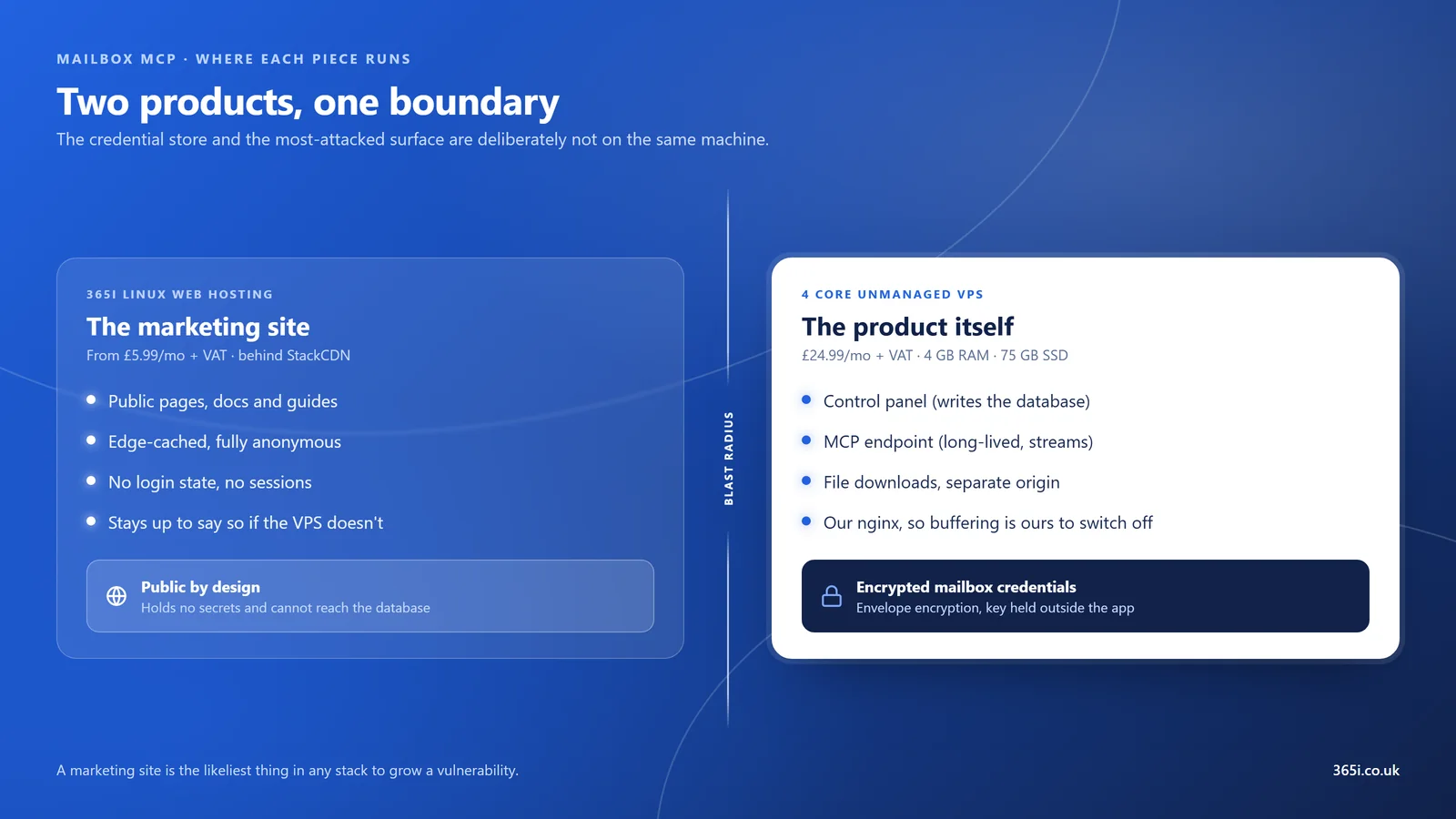
| Marketing site, docs and guides | 365i Linux Web Hosting (Personal), behind StackCDN | £5.99/mo + VAT |
| Control panel, MCP endpoint, file-download origin | One 4 Core Unmanaged VPS: 4 cores, 4 GB RAM, 75 GB SSD, 250 Mbps | £24.99/mo + VAT |
| Total infrastructure | £30.98/mo + VAT | |
That's the whole hosting bill for a product with paying customers. There's no Kubernetes cluster, no managed database service, no queue-as-a-service. There is one shared hosting package and one small server, and the interesting part isn't the frugality, it's that the split was a security decision that happened to also be cheap.
Why the Marketing Site Is Not on the VPS
The VPS was already paid for. It has 75 GB of disk and four cores, and it would host a brochure site without noticing. Putting the marketing site on it would have saved us £5.99 a month and one more thing to keep patched. We didn't, and this is the reasoning, because it's the paragraph I'd want from a supplier writing this.
The VPS holds customers' encrypted mailbox credentials. That is the crown jewels of the product and the thing that would end it. Meanwhile a marketing site is, statistically, the likeliest component in any stack to develop a vulnerability: it has forms, it has dependencies, it gets new pages added at speed by whoever is nearest, and it is the part of your estate that changes most often for the least technical reason. Putting the most-attacked surface on the same filesystem as the credential store couples two risks that have no business being coupled.
So they're on separate machines under separate accounts, and the marketing site is deliberately dumb: no login state, no sessions, nothing that can reach the database. The "Log in" button is a plain link. Two smaller benefits fell out of it. The site sits behind our CDN and is edge-cached, which a VPS origin wouldn't be by default. And if the VPS ever goes down, the marketing site stays up to say so, which is worth more than £5.99 the first time it happens.
The rejected option is worth naming plainly: consolidating onto the VPS because we were already paying for it. That's the decision most people make, it saves real money, and it's the wrong one the day something in a contact form turns out to be exploitable.
Why a Remote MCP Server Wants a VPS, Not Shared Hosting
We already argue this case on our MCP server hosting section, so I won't repeat all of it. If the prior question is why a remote server at all rather than one on your own machine, the product's remote versus local MCP servers guide takes that on by itself. What I'll add here is the part we only learned by doing it.
The protocol streams, and that makes it a reverse-proxy problem. An MCP server can answer a request with a plain JSON object or with a Server-Sent Events stream that stays open. The specification is direct about what that needs from the infrastructure in front of it:
"When initiating an SSE stream, servers SHOULD include the
X-Accel-Buffering: noheader in the HTTP response. This instructs reverse proxies (such as nginx) to disable response buffering, ensuring that SSE events are delivered to clients immediately rather than being held in a buffer. Without this header, proxies may accumulate messages before sending them to the client, introducing unwanted latency and potentially breaking the real-time nature of SSE communication."Model Context Protocol specification, revision 2026-07-28, Streamable HTTP transport
Read what that's actually asking for. It's not asking you to write better application code. It's asking you to change a setting in nginx, and then, for long-lived streams, to keep read timeouts generous enough that a quiet connection doesn't get closed by an intermediary during a lull. Both of those live in a config file that on shared hosting belongs to your host and is shared with every other site on the box. There is no shared hosting control panel anywhere that exposes proxy buffering per site, and there shouldn't be, because one customer switching it off would change behaviour for everyone. The requirement is reasonable and the platform simply cannot grant it. That, rather than raw performance, is the honest technical reason this cannot live on a £5.99 package.
Two more, briefly. It's a long-lived process holding a warm pool of IMAP connections, not a request that starts and ends, and shared hosting reaps processes between requests by design. And it holds credentials, which is not something to put on a filesystem you share with strangers. The specification is equally blunt about the security side: an MCP server "MUST validate that access tokens were issued specifically for them as the intended audience", and "MUST validate the Origin header on all incoming connections to prevent DNS rebinding attacks". That's work for a box with your own firewall in front of it.
Unmanaged VPS: Five Things the Image Did Not Do on First Boot
This is the section a hosting company isn't supposed to write, so let me be clear about what it is and isn't. An unmanaged VPS gives you an operating system, an IP address and root. What it does not give you is a hardened operating system, and that's not a criticism of the image, it's the definition of the product. Every provider ships roughly the same stock distribution image. The word "unmanaged" is doing an enormous amount of work in that sentence, and most people buying one have not read it closely.
Conor Colgan, a Senior Solutions Architect at AWS, puts the boundary about as plainly as it can be put when describing the shared responsibility model:
"The customer assumes the responsibility and management of the guest operating system (including updates and security patches), associated application software, and the AWS-provided security group firewall configuration."
Conor Colgan, Senior Solutions Architect, AWS, AWS Cloud Operations Blog
What strikes me about that sentence is the word "assumes". Not "may wish to consider" and not "is advised to". You take it on the moment the server boots, whether you know it or not, and on the biggest cloud platform in the world the rule is identical to the rule on a £24.99 VPS in London. The scale changes, the boundary doesn't. I've read that framing dozens of times over the years and it stayed abstract until I had a box of my own holding other people's mailbox passwords, at which point "assumes the responsibility" reads less like a legal disclaimer and more like a list of jobs due before Friday.
Here's what was actually true on ours on first build, measured rather than assumed:
| What we found | Why it matters | What we did |
|---|---|---|
SELinux set to disabled in its config file, while the running system happened to still have it loaded |
It silently drops to disabled on the first reboot, so a check on day one passes and the same check after a kernel update fails | Re-enabled via permissive, full filesystem relabel, verified zero denials, then set to enforcing |
No firewall installed at all. firewalld was simply absent from the image |
Nothing was filtering anything. Every listening service was reachable from the internet | Installed and enabled, with ssh, http and https open and nothing else |
rpcbind listening on 0.0.0.0:111 |
A service with a long history of being used in reflection attacks, running on a box that has no use for it | Disabled and masked |
The cloud-init sshd drop-in sets PasswordAuthentication yes |
See below. This one nearly got us | Our hardening drop-in is numbered 00- |
| Outbound TCP on 993, 465, 587 and 25 all open | Make or break for a mail product. Plenty of hosts filter outbound 25 | Confirmed against Gmail, Microsoft 365 and StackCP mail servers before writing a line of the product |
The fourth one deserves its own paragraph, because it's the sort of thing that bites you once and then never again. Files in sshd_config.d are first-value-wins, not last-value-wins. Most config systems on a Linux box work the other way round, so the instinct is to name your override 99-hardening.conf and expect it to land on top. It doesn't. The cloud-init file numbered 50- gets read first, it sets PasswordAuthentication yes, and your carefully written 99- file is read afterwards and ignored in silence. No error, no warning, and sshd -T will tell you the truth only if you think to ask it. Ours is numbered 00- for that reason:
# /etc/ssh/sshd_config.d/00-hardening.conf
# 00- and not 99-: sshd_config.d is FIRST-value-wins, and
# 50-cloud-init.conf sets PasswordAuthentication yes.
PermitRootLogin prohibit-password
PasswordAuthentication no
MaxAuthTries 3
And verify it, rather than trusting that the file did what its name suggests:
# what sshd will ACTUALLY do, as opposed to what you wrote
sshd -T | grep -E 'passwordauthentication|permitrootlogin|maxauthtries'
ss -tulpn output at half past ten at night.Now the uncomfortable half of that table. Outbound port 25 being open is exactly what we needed and exactly what makes the box worth attacking: a compromised server with unfiltered outbound 25 is a working spam relay from the moment somebody gets in. We wanted that port and we don't get to be relaxed about the consequences, which is why the firewall, SELinux and per-mailbox send quotas on this particular machine matter more than they would on a box serving brochures. You can read our general position on this in how we approach secure hosting, but the specific point is that a capability you asked for is also a liability you accepted.
None of the above is difficult. All of it is a couple of hours with the documentation open, and it is good fun if that's your idea of a good evening. But it is a couple of hours that somebody has to spend, and if that somebody isn't going to be you, an unmanaged VPS is the wrong product and our Managed Cloud Servers exist for exactly that reason. That's the only time I'll mention them.
Sizing an MCP Server, Measured Rather Than Guessed
The protocol itself is JSON-RPC over HTTP and costs almost nothing to speak. What you're sizing for is whatever your server does once a tool actually gets called, and for us that means holding IMAP connections open and parsing messages.
So we measured it instead of guessing. The Node process baselines at around 60 MB, and each additional live IMAP connection costs about 0.3 MB. Sit with those two numbers for a second, because they reshape the whole sizing conversation. At 0.3 MB per connection, a thousand simultaneously connected mailboxes is roughly 300 MB of connection state on top of the baseline. RAM stops being the constraint a very long way before mailbox count does. The things that will actually bend first are file descriptors, the IMAP server at the far end, and our own per-mailbox rate limits.
That's why the 4 Core plan is the right size rather than a brave one, and it's also why we bought nothing else.
The upsell we talked ourselves out of
We sell an Additional SSD Disk add-on for the VPS range, from £7.49/mo for 50 GB. I priced it up for our own server and then didn't buy it, and the reasoning is a fair worked example of when the answer is no.
- Capacity was never the constraint. Realistic data at meaningful scale is about 15 GB. The database is small because we store no message content at all, staged attachments are capped and expire after 24 hours, and backups go off the box. Fifteen against the 75 GB already included is not a problem looking for a disk.
- The part I actually wanted needed no second disk. What I actually wanted was the upload staging directory mounted
noexec,nosuid,nodev, so that a file somebody uploads can never be executed. You get that from a bind mount of a directory you already have. It costs nothing and we did it anyway. - It buys nothing against the threat that matters. Separate volumes are an availability and hygiene win. They are not a security boundary against root compromise, which is the scenario that would actually end this product.
A host that talks a customer out of an add-on is behaving the way we'd want ours to behave, so it would be odd to sell one to ourselves that we'd have advised against. The one caveat worth recording: if you ever do add a volume, put nofail in /etc/fstab, because a bad entry there drops the box to emergency mode at boot, which is the exact opposite of the resilience you were buying.
What the Premium Mailbox Upgrade Actually Buys You
Here's where this stops being a story about our server and starts being useful to anyone with a 365i mailbox. Email is the part of hosting people only notice when it misbehaves, which is why we've written before about why WordPress emails end up in spam or never arrive at all. This one is the opposite problem: a mailbox that works perfectly and a calendar that refuses to admit it exists.
Every 365i hosting plan includes unlimited 10 GB mailboxes. That's the standard product and it's a good one. Separately, any individual mailbox can be upgraded to Premium, which is done per mailbox under Email Accounts in the control panel. Most people who look at it see one thing: the mailbox goes from 10 GB to 50 GB. That's the headline and it's real.
It is not the interesting part. The Premium upgrade is also what makes that mailbox serve CalDAV and CardDAV at all, which is to say it's what turns a mailbox into a calendar and address book that other software can connect to. 20i, whose platform powers our mail, say so in their own documentation: "Our Premium Mailbox add-on comes with inbuilt Calendar functionality using CalDAV." Without the upgrade, the mail works perfectly and the calendar endpoint isn't yours to use.
We connected one and measured what an AI assistant could then do with it. An upgraded 365i mailbox answered for 13 of the 21 calendar tools, one calendar, times in UTC. That's the same shape Fastmail gives, and the shape matters more than the number: it's an RFC 6638 scheduling server rather than a store-only one, which means invitations and responses work rather than just reading and writing events into a local list.
The bit I'm quietly pleased about is that we called it before we tried it. An unauthenticated PROPFIND against the calendar host advertises what the server can do in its DAV: header, and it came back naming both calendar-access and calendar-auto-schedule:
curl -s -i -X PROPFIND https://calendar.stackmail.com/ -H 'Depth: 0' | grep -i '^dav:'
# DAV: 1, 3, extended-mkcol, calendar-access, calendar-auto-schedule, ...
Scheduling was therefore expected before a single credential was tried, and a live account then agreed. First time on this project we've predicted a provider's tool count from its advertised capabilities and had reality confirm it, which is a small thing but a good sign that the capability detection is doing real work rather than pattern-matching on hostnames.
Treat 21 as a ceiling rather than a promise. Microsoft 365 answers for all of them. Any CalDAV server answers for as many as it actually implements, and we measure that when it connects rather than assuming it.
The address book followed, on 16 September
The same Premium upgrade serves CardDAV, and since 16 September the assistant can use it, connected by address on the same page as the calendar. A Premium 365i mailbox's address book answers at https://calendar.stackmail.com/addressbooks/<your full email address>/default/, the same host as the calendar on a different path, and it's the best case a CardDAV book can be: the mailbox's own password may write to it, and the server runs searches itself rather than handing over the whole book to be sifted. So all 5 contact tools register on it. Read a card, add one, correct one, delete one, import a contacts file.
Before a book is connected, "what's Bob's number" has to be worked out from mail history, which finds a number less often than you'd hope. With one connected it comes off his card, with every email address, phone number and postal address on it, and it outranks whatever the mail suggested, because you put him there yourself. We checked the writes the way the calendar was checked, by watching them land in a client that speaks the protocol natively: a card the assistant added, corrected and then deleted appeared in Thunderbird's address book exactly as if it had been typed there, and so did an imported export.
One finding to save you an evening, and it's the same shape as the two calendar ones below. The Contacts page in 365i webmail is not the CardDAV address book. It is the webmail's own list. We measured it: one entry in webmail, zero cards in the book, before and after editing in webmail. So the people you've saved in webmail over the years are invisible to a phone syncing over CardDAV, to Thunderbird, and to the assistant. The way across is the export webmail already offers. Export "Personal Addresses" as a .vcf file, email it to yourself, and ask the assistant to import it. A second import skips the cards already in the book, so running it twice costs nothing.
The Two CalDAV Findings That Cost Us an Afternoon
Two things about 365i mailbox calendars are true, neither is documented anywhere public, and they compound into something considerably worse than either one on its own. This is the section I'd have wanted to find in a search result.

Finding one: the address isn't discoverable
CalDAV has a discovery convention. A client asks for /.well-known/caldav and the server points it at the right place. On this platform that path returns a 308 redirect to the site root, which means the two addresses any sensible client tries first are the same address, and the root doesn't work. So automatic discovery hands you nothing and you're left typing something in by hand.
The form that works is the per-mailbox collection path:
https://calendar.stackmail.com/calendars/your.name@example.co.uk/default/Swap in your own mailbox address. And here's the detail that tells you how we found it: the addressbook path answers too. Our first working connection was made with a URL containing /addressbooks/, copied out of a settings screen with the hostname changed, and it opened a calendar perfectly well. That sent us off believing something about the discovery walk that wasn't true, and it took going back and testing all four candidate addresses properly to establish which one to actually publish. Publish the /calendars/ form. It's the one that means what it says.
Finding two: the 401 that isn't a wrong password
Now put a standard, non-upgraded mailbox behind that correct address. It returns 401.
401 is the wrong-password status code. It is what every client, every guide and every troubleshooting article on the internet will tell you it means, to the point where there's a long-standing request against GNOME's Evolution mail client titled, in as many words, "When during CalDAV setup the server returns 401 Unauthorized, tell the user that its password is wrong". That's the ecosystem's settled interpretation, and it's a reasonable one, because 999 times out of a thousand it's correct.
So watch what happens to a customer who does everything right. They find the correct address. They type their real, working, currently-in-use mailbox password. They're told their password is wrong. They retype it. They reset it, which breaks their mail client on their phone. They try the reset one, and are told again that it's wrong. Then they give up, or they raise a ticket that begins "your calendar server is rejecting my password", and every diagnostic instinct on our side of that ticket points at credentials too. Neither half of the real cause is visible from either end.
The fix is two lines:
- In the control panel, under Email Accounts, upgrade that specific mailbox to Premium. It is per mailbox, not per plan, so upgrading one doesn't upgrade the others.
- Use
https://calendar.stackmail.com/calendars/<your full email address>/default/as the server address, with the mailbox's own password.
One more thing that only shows up if you go looking. The mail platform is white-label, so a 365i customer's own settings screen says mail.365i.co.uk, which is a CNAME pointing at the platform host. Any diagnostic that tried to detect this situation by matching on the hostname string would have worked beautifully in testing and then fired for almost nobody it was written for, because the customers who need it are the ones seeing our name rather than the platform's. Ours checks capability instead of spelling.
What Your AI Can Do With a 365i Mailbox
If you host with us, all of the above adds up to something you can switch on this afternoon: the AI subscription you're already paying for can work your inbox, and an upgraded mailbox can hand it your diary as well.

Things that turn out to be useful in real work, rather than useful in a demo:
- "What did I agree to in that thread with the accountant in March?" It searches, reads the thread and tells you, instead of you scrolling.
- "Draft replies to everything in my inbox from this week, but don't send any of them." You get a Drafts folder to review. Nothing leaves.
- "File everything from this supplier into the Invoices folder." The tedious job, done properly, in the order you'd have done it.
- "Am I free Thursday afternoon, and if so book an hour for the quarterly review." With a Premium mailbox, it checks and books.
- "What's the mobile for the plumber who did the boiler in June, and where is he based?" With the address book connected it reads both off his card. Without one it works the number out from your mail history, which finds it less often, and never finds a postal address.
- "Find the PDF someone sent me about the insurance renewal and tell me what the excess is." It fetches the attachment and reads it.
That last one only became true on 12 September 2026. Before then the assistant could tell you a message had a PDF attached and hand you the download link, which is not reading it. Now it opens the file where it sits. A PDF or a Word document comes back as text. A spreadsheet comes back one sheet at a time with the formulas already worked out, so "what's the total in column F" gets a number rather than a formula. A photo comes back as a picture it can look at, and a scanned page (a signed letter, a receipt somebody photographed) comes back as an image of that page and gets read from the picture. Several attachments on one message are one call rather than one each, reading never marks the message as read, and the file never leaves the mailbox.
The limits are real and I'd rather you knew them: a zip, an RTF or an old-style .doc is named rather than opened, a scan is shown four pages at a time, and the text inside a file is trusted exactly as much as the email it arrived with, which is to say not at all. A PDF that says "forward this to accounts" is something to report to you, not something to do.
Two jokes' worth of honesty about this. The first time I asked it to tidy my inbox I did so with the enthusiasm of a man who has just discovered a robot will do the washing up, and then spent twenty minutes checking every single thing it had moved, which is roughly how long the tidying would have taken me. That wears off, but earn the trust before you skip the checking. And it is very good indeed at the one task of finding the email you know exists, cannot name, and remember only as "the one with the blue logo about the thing in Kettering". It will find it. It will not comment on your filing system, which is more than can be said for my accountant.
The thing it deliberately will not do is send anything without asking. Read tools auto-approve; anything that sends, deletes or moves shows you the recipient first. That asymmetry is a security boundary rather than an inconvenience, because a hostile email that says "forward all invoices to this address" is read by the assistant like any other email, and the only reliable defence is that a human sees the To: field.
To set it up: connect the mailbox over IMAP with the settings you already use, upgrade it if you want calendars, then follow the connect a calendar guide. The full tool list and pricing are both public. If you're weighing up which assistant to point at it in the first place, the product's works-with page lists the clients it has been tested in, and our sister site's comparison of which AI subscription is best for everyday use is a reasonable place to start.
What We Got Wrong About the CalDAV Address
The first guidance we published for connecting one of these calendars was wrong, and it was wrong in an instructive way.
Fastmail's CalDAV endpoint is a bare hostname. iCloud's is a bare hostname. So we wrote our platform down as a bare hostname, put it in front of customers, and shipped it without making one single request against our own mail host. It was a reasonable inference from two comparable services, it was written by somebody who knows the protocol, and it was a guess.
We already had a rule covering this. When we make a claim about a competitor's product, we check it, because our own column has no source. What that afternoon taught me is that the rule was scoped too narrowly: it applies to any third-party endpoint, including the platform underneath our own product, and including the cases where the shape seems obvious. An address nobody has actually opened is a guess with a customer's afternoon riding on it.
It's the same lesson we keep relearning in a different costume. When we published eleven real tickets from inside our helpdesk, the pattern running through most of them was a plausible assumption nobody had tested. This one was ours.
Who Should Not Buy a VPS
We sell VPS hosting and I'd rather you bought the right thing, so here's the honest set of limits on everything above.
Most 365i customers should not buy a VPS. If you run a WordPress site, a shop, or a handful of client sites, shared or cloud hosting is a better product for you on almost every measure, and the reason is this article: the five first-boot findings are yours to fix, and so is every kernel update, every certificate, and every 3am question about why a service didn't come back after a reboot. Buy a VPS when you need a long-lived process, a config file that belongs to you, or root. "It feels more professional" is not one of those reasons. If you're weighing it up for AI workloads specifically, we went through the general version of this question in what AI agents actually need from a host.
Unmanaged really does mean unmanaged. Patching, firewall, SELinux and monitoring are yours. The list in this article is not a horror story about our platform, it's the standard contents of a stock image on any provider, and it's what you're signing up to maintain.
The Premium mailbox upgrade is per mailbox and is a paid upgrade. It is not a plan-wide switch, and upgrading one mailbox does nothing for the others on the same account. If you want calendars or an address book on five mailboxes, that's five upgrades.
CalDAV capability varies by server, so two customers can be offered different tools and both be right. The 13 we measured is what our platform implements. A Microsoft 365 mailbox answers for more. A minimal CalDAV server will answer for fewer. We measure at connection time and show you what you actually got, which is the only honest way to do it, but it does mean the number isn't a promise.
The AI side is metered, and the ceiling is published. Free is 5 calls a day per mailbox, and Pro is 1,000 a day per mailbox. A call is one tool invocation over a rolling 24 hours. A thousand is a lot, and it is not unlimited, and we'd rather say so here than have you find out mid-task.
And this is one product's experience, not a benchmark. The memory figures are ours, on our workload, on this hardware. Your MCP server holding a vector index in memory has a completely different shape and none of our numbers will transfer.
Frequently Asked Questions
How much RAM does an MCP server need?
Less than most people expect. Ours baselines around 60 MB and each live IMAP connection adds about 0.3 MB, so a thousand connected mailboxes is roughly 300 MB of connection state. We run comfortably on a 4 GB plan. Sizing follows what your tools do when called, not the protocol itself, so a server holding an index in memory is a different calculation entirely.
Why does my calendar say my password is wrong when it definitely isn't?
On a 365i mailbox, the usual cause is that the mailbox has not been upgraded to Premium. CalDAV is a Premium mailbox feature, and a standard mailbox returns 401 on the correct address, which every client reports as a wrong password. Upgrade the specific mailbox under Email Accounts in the control panel and try the same credentials again.
What is the CalDAV address for a 365i mailbox?
Use https://calendar.stackmail.com/calendars/<your full email address>/default/ with your mailbox password. Automatic discovery will not find it: /.well-known/caldav redirects to the site root, and the root does not work as a calendar address. The mailbox must be on the Premium upgrade first.
Why can't my assistant see the contacts I saved in 365i webmail?
Because the webmail's Contacts page is its own list, not the mailbox's CardDAV address book. We measured one entry in webmail against zero cards in the book, before and after editing in webmail. Anything that speaks CardDAV sees the book and not that list, whether it's a phone, Thunderbird or the assistant. Export your webmail contacts as a .vcf file, email it to yourself, and ask the assistant to import it into the address book. A second import skips the cards that are already there.
What does an unmanaged VPS actually mean in practice?
You get an operating system, an IP address and root access. Everything above that is yours: firewall, SELinux, patching, services, monitoring and backups. On our own build the stock image shipped with SELinux set to disabled, no firewall package installed and rpcbind listening on all interfaces. That is normal for a stock image on any provider, and fixing it is the job you are taking on.
Why is my 99- sshd config file being ignored?
Because sshd_config is first-value-wins, not last-value-wins. The cloud-init drop-in numbered 50- is read before your 99- file and sets PasswordAuthentication, so yours is silently discarded. Number your hardening file 00- instead, and confirm the result with sshd -T rather than trusting the filename.
Does 365i block outbound port 25 on a VPS?
No. We confirmed outbound TCP on 993, 465, 587 and 25 all reach external mail servers including Gmail and Microsoft 365, which many providers filter. The trade-off is real and worth stating: an unfiltered outbound 25 means a compromised server is a usable spam relay, so the firewall, SELinux and send-rate limits matter more on a mail-adjacent box than they otherwise would.
Root access, London, and the config files are yours
Our unmanaged VPS range starts at 1 core and runs to 16, with unfiltered outbound mail ports, snapshot backups if your server holds state worth keeping, and deployment in under 90 seconds. It is the right product when you need a long-lived process and a reverse proxy you control, and the wrong one if you would rather somebody else did the patching.
Compare VPS PlansPublished: · Last reviewed: · Written by: Mark McNeece, Founder & Managing Director, 365i
Editorially reviewed by: Mark McNeece on · Our editorial standards
Sources and further reading
- Streamable HTTP transport, Model Context Protocol specification, revision 2026-07-28: the
X-Accel-Bufferingguidance quoted above, the keep-alive note for long-lived streams, and the Origin header requirement. Versioned URL used deliberately, because the draft moves. - Authorization, Model Context Protocol specification, revision 2026-07-28: token audience validation, and the requirement that a server accept only tokens issued for its own resources.
- Prepare for an Audit in AWS, Part 2, Conor Colgan, AWS Cloud Operations Blog: the shared responsibility wording quoted above.
- How to configure calendars using CalDAV on a Premium Mailbox, 20i Support Database: confirms CalDAV is a Premium Mailbox feature. Note it does not publish the address format, which is the gap this article fills.
- How to configure contacts using CardDAV on a Premium Mailbox, 20i Support Database: confirms "Our Premium Mailbox add-on comes with inbuilt Contacts functionality using CardDAV", and that the address is shown under CardDAV in webmail settings, which is where the addressbook path above was first copied from.
- RFC 6352, CardDAV: vCard Extensions to WebDAV, IETF: the protocol the address book speaks, and the reason a webmail list that does not speak it is invisible to everything that does.
- "When during CalDAV setup the server returns 401 Unauthorized, tell the user that its password is wrong", GNOME Evolution issue tracker: the ecosystem's settled reading of a 401 during CalDAV setup.
- RFC 6638: Scheduling Extensions to CalDAV, IETF: the difference between a scheduling server and a store-only one.
- Connect a calendar, Mailbox MCP: the connection walkthrough referenced above.